
|
Deutsch |
English |
||
|
Produktbeschreibung |
Product Description |
||
|
Microsoft 365 Apps Erhalten Sie monatliche Updates und brandneue Funktionen mit den vollständig installierten und stets aktuellen Versionen von Outlook, Word, Excel, PowerPoint und OneNote (abweichender Funktionsumfang) für Windows oder Mac sowie Access und Publisher (nur PC).
1 TB sicherer Cloudspeicher pro Benutzer Bearbeiten und teilen Sie Dokumente, Fotos und andere Inhalte mit 1 TB OneDrive-Cloudspeicher – an praktisch jedem Ort und auf dem Gerät Ihrer Wahl.
Intranet und Teamwebsites Über Teamwebsites in SharePoint können Sie Ihre Mitarbeitenden informieren, einbinden und ihnen Zugang zu Inhalten, Wissen und Prozessen ermöglichen. Vermitteln Sie außerdem klare Botschaften mit ansprechenden und benutzerfreundlichen Websites.
E-Mail und Kalender Nutzen Sie mit Outlook einen E-Mail-Dienst für Unternehmen. Jeder Benutzer erhält ein Postfach mit 50 GB Speicherplatz und kann Anlagen bis zu 150 MB senden.
Digital Storytelling – einfach und professionell Erstellen Sie in Sway ganz einfach ansprechende, interaktive und webbasierte Berichte, Präsentationen, Newsletter, Kursmaterialien und mehr.
Intelligente Suche und Discovery Finden Sie mit der intelligenten Suche Inhalte und Fachwissen in unternehmensweiten Datenquellen wie SharePoint, Delve und Microsoft 365 Apps.
Ideen und Projekte organisieren Gemeinsam Ideen sammeln, planen und arbeiten in teamorientierten Arbeitsumgebungen mit Microsoft Loop
Im Team vernetzen und zusammenarbeiten Mit Microsoft Teams haben Sie alles zur Hand, was ein Team für die Zusammenarbeit braucht: Chat, Inhalte, Tools und Kontakte.
Web- und Mobile-Apps entwickeln Entwickeln Sie mit Microsoft PowerApps ganz einfach eigene Business-Apps für das Web und für Mobilgeräte – entweder von einer Vorlage oder einfach so. Keine Programmierung erforderlich.
Automatisierte Workflows Erstellen Sie mit Microsoft Power Automate automatisierte Workflows, die Ihre Apps und Dienste verbinden. So können Sie z. B. automatisierte Benachrichtigungen empfangen, Dateien synchronisieren und Daten sammeln. Keine Programmierung erforderlich.
Für Desktops, Tablets und Mobilgeräte Nutzen Sie die vollständig installierbaren Microsoft 365 Apps auf mehreren PCs/Macs, Tablets und Mobilgeräten (einschließlich Windows, iOS und Android).
Chat und Onlinebesprechungen Kommunizieren Sie in Microsoft Teams per SMS, Telefon- oder Videoanruf. Halten Sie Onlinebesprechungen, indem Sie Ihren Bildschirm mit einem Klick freigeben, und Videokonferenzen in HD.
Videobearbeitungstools Erstellen und teilen Sie professionelle Videos mit Microsoft Clipchamp. |
Microsoft 365 apps Get monthly updates and the latest features and capabilities with fully installed and always-up-to-date versions of Outlook, Word, Excel, PowerPoint, and OneNote (features vary) for Windows or Mac, and Access and Publisher (PC only).
1 TB of secure cloud storage per user Edit and share documents, photos, and more from anywhere, on all your devices with 1 TB of OneDrive cloud storage.
Intranet and team sites Inform and engage your organization and connect people to content, knowledge, and processes with team sites on SharePoint. Tell your story with beautiful, easy-to-use sites.
Email and calendars Get business-class email with Outlook, including a 50 GB mailbox per user, and send attachments of up to 150 MB.
Professional digital storytelling Easily create engaging, interactive, web-based reports, presentations, newsletters, trainings, and more with Sway.
Intelligent search and discovery Discover content and expertise across your organization with intelligent search across all your data sources including SharePoint, Delve, and Microsoft 365 apps.
Organize projects and ideas Think, plan, and create together in collaborative workspaces with Microsoft Loop.
Connection and collaboration Instantly access everything your teams may need including chat, content, tools, and people with Microsoft Teams.
Web and mobile app development Quickly build custom business apps for web and mobile with Microsoft Power Apps. Choose from templates or start from scratch. No coding required.
Workflow automation Build automated workflows between apps and services to get notifications, synchronize files, collect data, and more with Microsoft Power Automate. No coding required.
Works across multiple devices Get the fully installed Microsoft 365 apps on multiple PCs, Macs, tablets, and mobile devices (including Windows, iOS, and Android).
Instant messaging and online meetings Communicate using text, voice, or video calls with Microsoft Teams. Host meetings on the web using one-step screen sharing and HD video conferencing.
Video editing tools Create and share professional-looking videos with Microsoft Clipchamp. |
||
|
Technische Details |
Technical details |
||
|
Herstellergarantie: |
Keine Garantie |
Manufacturer’s Warranty: |
No guarantee |
|
Kategorie: |
Büro |
Category: |
Office |
|
Plattform: |
Windows, MacOS, Android, iOS |
Platform: |
Windows, MacOS, Android, iOS |
|
Unterstütze Plattform: |
Prozessor Windows-Betriebssystem: 1,6 GHz oder schneller (zwei Kerne) Empfehlung für Microsoft Teams: 2 GHz oder schneller macOS: Intel-Prozessor iOS: N/V
Betriebssystem Windows-Betriebssystem: Windows 11, Windows 10, Windows 8.1, Windows Server 2019 oder Windows Server 2016. macOS: Eine der drei letzten Versionen von macOS. iOS: Microsoft 365 Apps für iPad® und iPhone® (einschließlich Outlook für iOS) werden unter den beiden letzten Versionen von iOS und iPadOS unterstützt. Android: Microsoft 365 Apps für Android (einschließlich Outlook für Android) können auf Tablets und Smartphones installiert werden, die unter einer beliebigen unterstützten Android-Version ausgeführt werden und über einen ARM-basierten oder Intel x86-Prozessor verfügen. Der Support ist auf die letzten vier Hauptversionen von Android beschränkt. Arbeitsspeicher Windows-Betriebssystem: 4 GB RAM; 2 GB RAM (32 Bit) macOS: 4 GB RAM Android: 1 GB iOS: N/V
Festplattenspeicher Windows-Betriebssystem: 4 GB verfügbarer Speicherplatz macOS: 10 GB verfügbarer Speicherplatz im Festplattenformat HFS+ (auch als macOS Extended bekannt) Bildschirm Windows-Betriebssystem: Auflösung von 1.280 x 768 Pixeln (32 Bit erfordert eine Hardware-beschleunigte Wiedergabe von mindestens 4K) macOS: Auflösung von 1.280 x 800 Pixeln.
Grafikkarte Windows-Betriebssystem: Für die Grafikhardwarebeschleunigung wird DirectX 9 oder höher mit WDDM 2.0 oder höher für Windows 10 (oder WDDM 1.3 oder höher für Windows 10 Fall Creators Update) benötigt. Für Microsoft Teams werden DirectX 9 oder höher, 128 MB Grafikspeicher und ein 32-Bits-pro-Pixel-fähiges Format benötigt. macOS: Keine Anforderungen an die Grafikkarte |
Supported Platform: |
Processor Windows OS: 1.6 GHz or faster, 2-core. 2 GHz or greater recommended for Microsoft Teams macOS: Intel processor iOS: N/A
Operating System Windows OS: Windows 11, Windows 10, Windows 8.1, Windows Server 2019 or Windows Server 2016 macOS: One of the three most recent versions of macOS iOS: Microsoft 365 apps for iPad® and iPhone® (including Outlook for iOS) is supported on the two most recent versions of iOS and iPadOS Android: Microsoft 365 apps for Android (including Outlook for Android) can be installed on tablets and phones running any of the supported versions of Android and have an ARM-based or Intel x86 processor. Support will be limited to only the last four major versions of Android
Memory Windows OS: 4 GB RAM; 2 GB RAM (32-bit) macOS: 4 GB RAM Android: 1 GB iOS: N/A
Hard Disk Space Windows OS: 4 GB of available disk space macOS: 10 GB of available disk space; HFS+ hard disk format (also known as macOS Extended)
Display Windows OS: 1280 x 768 screen resolution (32-bit requires hardware acceleration for 4K and higher) macOS: 1280 x 800 screen resolution
Graphics Windows OS: Graphics hardware acceleration requires DirectX 9 or later, with WDDM 2.0 or higher for Windows 10 (or WDDM 1.3 or higher for Windows 10 Fall Creators Update). Microsoft Teams requires DirectX 9 or later, 128 MB graphics memory, and 32-bits-per-pixel-capable format macOS: No graphics requirements |
|
Voraussetzungen: |
Eine Internetverbindung ist erforderlich, um Ihr Microsoft-Konto zu erstellen. |
Requirement: |
An internet connection is required to create your Microsoft-Account. |
|
Sprache: |
Mehrsprachig |
Language: |
Multi language |
|
Sonstiges: |
– |
Miscellaneous: |
– |
|
Links: Downloadlink: Supportlink: |
|||
|
Die technischen Daten werden uns von dritter Seite zur unverbindlichen Information zur Verfügung gestellt. Wir übernehmen keine Haftung für Fehler dieser Daten. |
|||
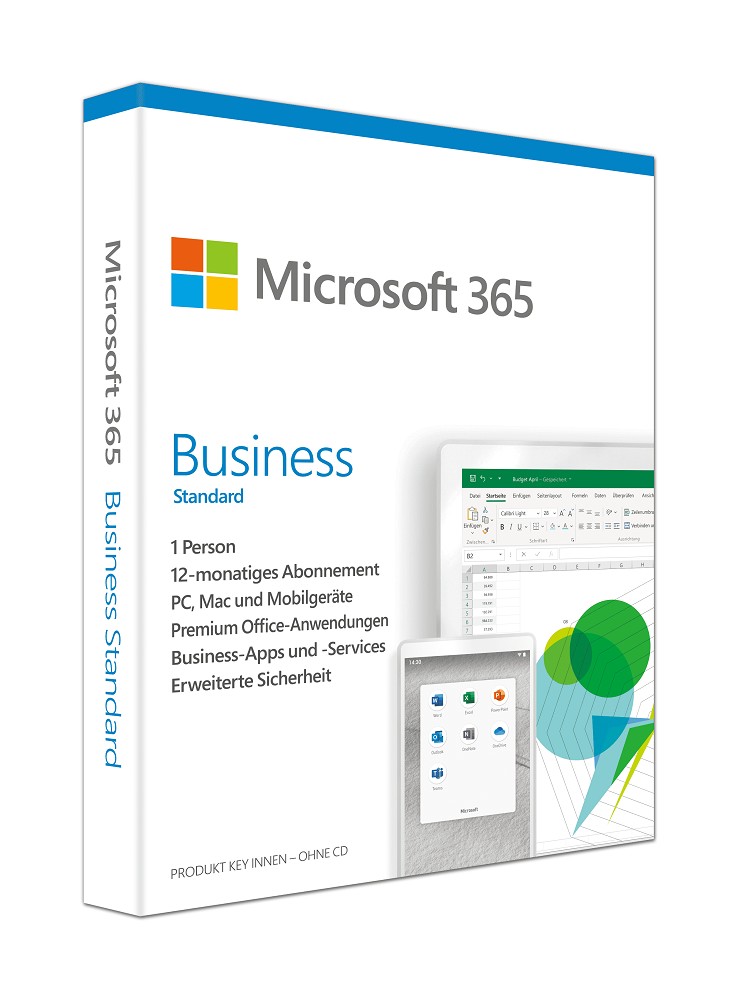
Microsoft 365 Business Standard (1 User + 15 Device – 1 Jahr) ESD
€ 127,99
inkl. MwSt.
46 vorrätig
Rezensionen
Es gibt noch keine Rezensionen.